Text messages and opt-in
dunkbot (Servesys Corporation) lets you text with your own assistant, your Bot. This page is public and shows exactly how a person opts in, what they receive and how to stop.
What the texts are
Every text comes from your own assistant Bot, and only goes to the mobile number you added and verified. They are the things you asked it for: replies to your questions, reminders and updates on tasks and routines you set up. dunkbot does not send marketing or promotional texts. A Bot asks you before it sends a text, and only the owner of a Bot can add a number to it.
How you opt in
Opting in happens inside a signed-in dunkbot account, in a Bot’s settings. The same steps apply to every number.
- Open the Bot’s settings and choose Texting. Enter your US mobile number.
- Tick the consent box. It is unchecked by default and the button that sends the code stays off until you tick it. It reads exactly:
Text me from my dunkbot Bot. Msg frequency varies. Msg & data rates may apply. Reply HELP for help, STOP to cancel.
Links to our Terms and Privacy Policy sit right under the box. - Choose “Text me a code”. We send a 6-digit verification code to that number by text. It works for 10 minutes.
- Enter the code and choose Verify. Your Bot can text the number only after this step.
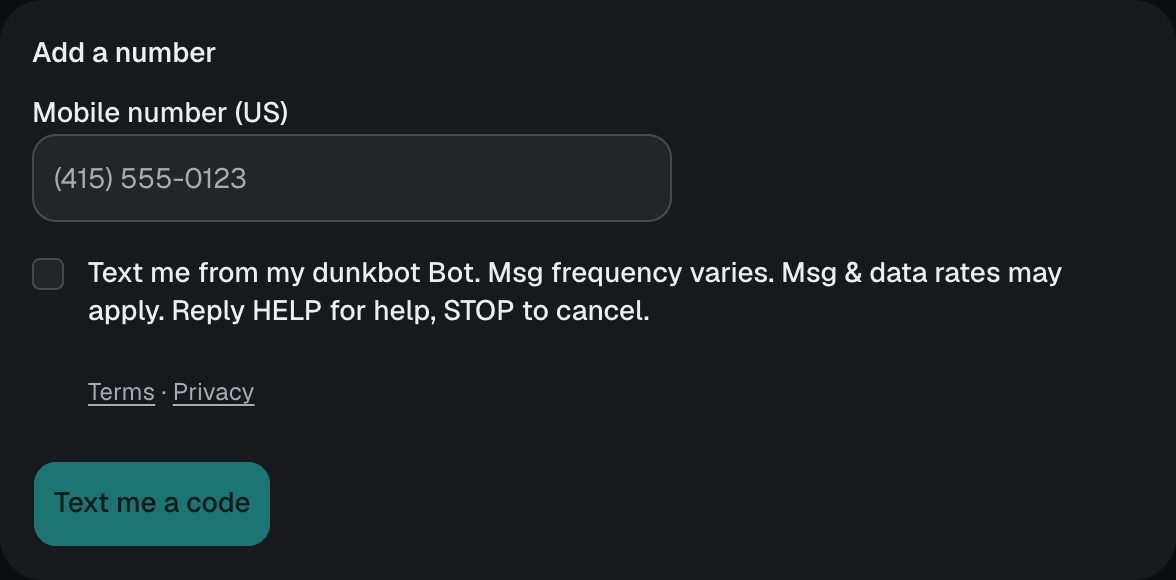
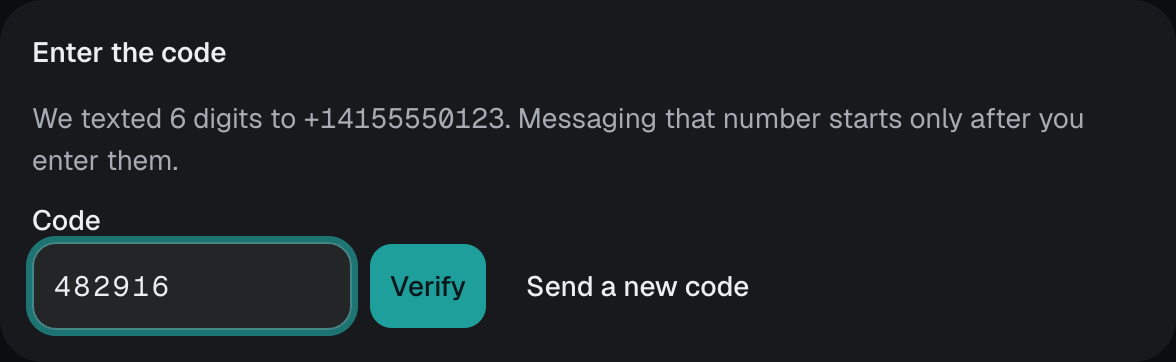
These screenshots are of the real settings screen, captured with test data. You need a dunkbot account to reach it, which is why they are shown here.
The confirmation text
After you verify, we send one confirmation text:
dunkbot: you’re set to get texts from your Bot. Msg frequency varies. Msg & data rates may apply. Reply HELP for help, STOP to cancel.
Frequency, rates, help and stopping
- Frequency. Message frequency varies. You only get texts about what you asked your Bot to do.
- Rates. Message and data rates may apply, set by your mobile carrier.
- Help. Reply HELP to any text for help, or email support@servsys.com.
- Stop. Reply STOP to any text to cancel. You get one last text confirming it and no more after that. Reply START to turn texts back on. You can also remove the number in the Bot’s Texting settings.
- Carriers. Carriers are not liable for delayed or undelivered messages. Consent to text is not a condition of any purchase.
Your number and your data
Mobile numbers and opt-in data are not shared with or sold to third parties for marketing. Text messaging opt-in data and consent are not shared with any third parties or affiliates for their marketing or promotional purposes. Read the full Privacy Policy and Terms of Service.
dunkbot is operated by Servesys Corporation.